Question 3.4 Answer - Top-Up Limit UX Issue Analysis
Issue Screenshot
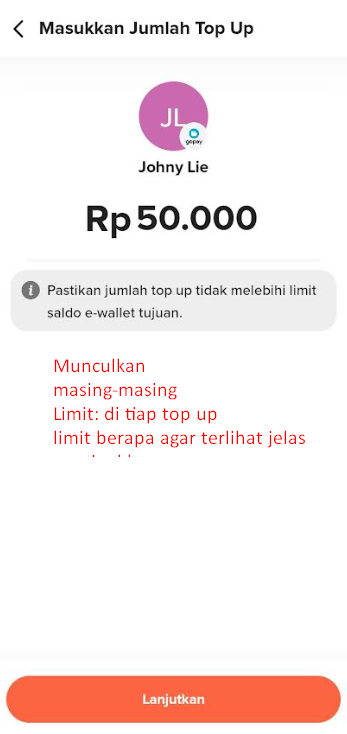
Flip Top-Up Limit UX Issue Analysis
This section identifies a confusing UX behavior related to top-up limits for e-wallets.
1. Problem
- Users attempt to top-up an e-wallet, but the app does not show the current balance limit or maximum top-up allowed.
- When the user enters an amount exceeding the limit, the app may show an error after submission instead of preventing it upfront.
Why it's confusing:
- Users cannot plan the correct top-up amount.
- The lack of limit information leads to trial-and-error input, which can be frustrating.
- Users may lose trust or abandon the flow if they repeatedly hit the limit without explanation.
2. Suggested Improvement
- Display the e-wallet’s top-up limit on the top-up screen, e.g.:
"Limit e-wallet: IDR 10,000" - Disable input or give real-time validation if the entered amount exceeds the limit.
- Optionally, provide a tooltip or help icon explaining how the limit works.
Why this is better
- Reduces user frustration by providing clear constraints before submission.
- Makes the transaction predictable and transparent.
- Enhances trust in the app by showing limits upfront.
3. Severity
- Medium
- From a UX/content standpoint: unclear limits may lead to failed transactions and user frustration, but the app still works.
Tip for UX Designers
- Always display transaction limits or constraints prominently.
- Use inline validation to prevent errors before submission.
- Consider showing both daily and e-wallet maximum limits if applicable.