Question 3.3 Answer - Admin Fee UX Issue Analysis
Issue Screenshot
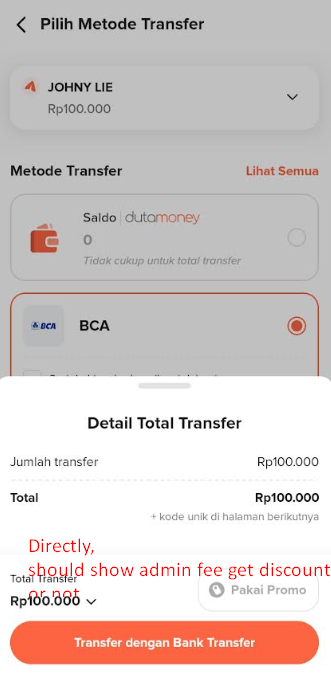
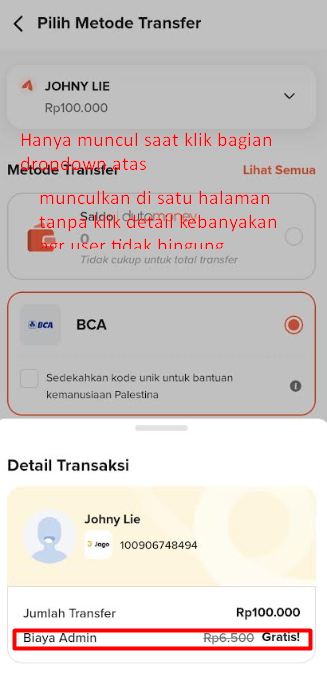
Flip Admin Fee UX Issue Analysis
This section identifies a confusing UX behavior related to the display of admin fees during the transfer flow.
1. Problem
- Users select a bank or transfer option from a top dropdown.
- The bottom sheet shows the admin fee.
- Users select from the bottom arrow icon to see transaction details.
- The bottom sheet that appears for transaction details doesn't show the admin fee.
- Only after interacting with the top dropdown ONLY might the fee display correctly.
Why it's confusing:
- Users are unsure if an admin fee applies.
- The inconsistency between the top selection and bottom sheet creates cognitive friction.
- Users might abandon or question the transaction due to unclear costs.
2. Suggested Improvement
- Ensure that admin fees are always visible in the bottom sheet, reflecting the currently selected option from the top dropdown.
- Update the bottom sheet dynamically in real-time whenever the top dropdown changes.
- Add tooltip or note directly without too many sheets displayed:
"Admin fee: IDR 2,500 included in total" for clarity.
Why this is better
- Reduces user uncertainty regarding transaction costs.
- Provides consistent and transparent feedback across UI components.
- Improves trust and reduces transaction abandonment.
3. Severity
- High
- From a UX/content standpoint: inconsistent display of fees can lead to hesitation or mistrust, though the transaction functionality still works but can make users feel uncertain about the total cost.
Tip for UX/UI Designers
- Always sync dropdown selections with detail sheets to prevent mismatched information.
- Display all fees clearly and consistently, especially for financial flows.
- Consider highlighting fee changes dynamically to draw user attention.