Question 3.2 Answer - Leaderboard UX Issue Analysis
Issue Screenshot
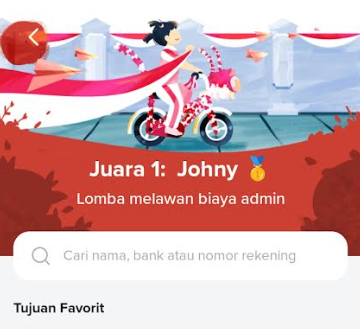
This screenshot illustrates the issue where the "Juara 1" badge is displayed without an accompanying leaderboard.
Flip Leaderboard UX Issue Analysis
This section identifies a confusing UX behavior in Flip's mobile app related to the display of "Juara 1" without an accessible leaderboard.
1. Problem
Users see a "Juara 1" (Top 1) label or badge indicating they are leading in some activity or promotion.
However, the page does not display a leaderboard, nor is there a visible way to verify rankings without navigating elsewhere.
Why it's confusing:
- Users cannot verify the claim of being first.
- It is unclear if the leaderboard exists, or if the "Juara 1" label is accurate.
- Users may feel misled or lose trust in the app.
2. Suggested Improvement
- Display a visible leaderboard or ranking table on the same page where the "Juara 1" badge appears.
- If a leaderboard is not yet implemented, clarify in copy:
"Leaderboard coming soon" or "Based on current points". - Use interactive or expandable leaderboard elements to allow users to see other rankings without leaving the page.
Why this is better
- Provides transparency and validates the "Juara 1" claim.
- Reduces user confusion and frustration.
- Improves trust and encourages continued engagement with competitive features.
3. Severity
- Low
- From a UX/content standpoint: misleading or unverifiable ranking claims may reduce confidence, though it does not break core functionality.
Tip for UX Writers / Designers
- Always ensure that rankings or badges are verifiable.
- Avoid showing accolades without context or access to supporting data.
- If a feature is under development, communicate clearly to set user expectations.